
New Page
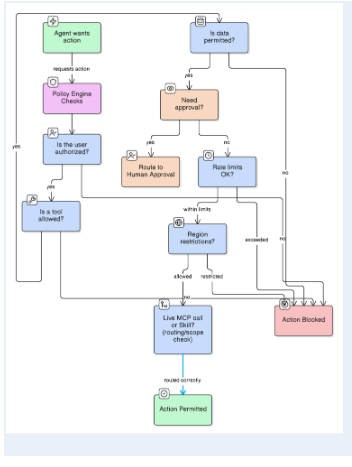
1. Agent Wants an Action
The process begins when the AI agent determines that it needs to perform an action to complete a task. This could involve accessing data, sending a message, updating a system, triggering a workflow, or interacting with an external application. At this point, the action is only a proposed intention—it has not yet been executed.
2. Policy Engine Checks
The proposed action is first evaluated by the Policy Engine. This component checks whether the requested action complies with predefined organizational rules, security policies, access controls, and operational restrictions. The policy engine acts as the first governance checkpoint, ensuring that the agent does not automatically perform actions that violate established rules.
3. Is the User Permitted?
If the action is allowed by the general policy, the system checks whether the specific user has permission to perform or authorize that action. This is important because an AI agent may be acting on behalf of different users with different roles and access levels. The system therefore ensures that the agent cannot use capabilities beyond the authority of the person making the request.
4. Is the Action Allowed?
The workflow then evaluates whether the specific action itself is allowed within the current context. An action may be generally available to an agent or user but restricted under certain conditions. For example, the system may allow access to a database but prohibit deleting records, or allow an agent to draft an email but not send it automatically. This step provides more granular control over what the AI is permitted to do.
5. Is It Permitted?
The additional permission check acts as a final validation point before the action moves into execution-related controls. It confirms that the required combination of policies, user permissions, and contextual conditions has been satisfied. If the action is not permitted, the workflow does not allow it to continue unchecked and instead routes it toward a blocked outcome.
6. Rule Limits
The Rule Limits component applies predefined boundaries to the proposed action. These limits may define what the agent can access, how much data it can retrieve, which tools it can use, or the scope of actions it can perform. Rule limits are particularly important for preventing an AI agent from exceeding its intended authority, even when it has technically been granted access to a particular system or tool.
7. Region
The Region check evaluates whether the action is allowed within a particular geographic, legal, or operational jurisdiction. Different countries or regions may have different requirements related to data access, privacy, financial operations, or regulatory compliance. This layer ensures that the AI system respects location-specific restrictions and governance requirements.
8. Human Approval
If the proposed action is considered sensitive, high-risk, or outside the agent's autonomous authority, it is routed to Human Approval. A human reviewer can assess the action and decide whether it should proceed. This creates a human-in-the-loop mechanism that is particularly useful for irreversible actions, sensitive decisions, financial transactions, or actions involving confidential information.
9. Is a Tool Allowed?
The workflow also checks whether the agent is permitted to use the specific tool required to perform the action. Even if an action itself is allowed, the tool being used may have separate restrictions. For example, an agent may be allowed to retrieve information but only through approved APIs or authorized systems. This ensures that tool access is governed independently from general action permissions.
10. Action Blocked
If any of the required checks fail—such as policy validation, user permission, action authorization, rule limits, regional restrictions, or human approval—the workflow can route the request to Action Blocked. This prevents unauthorized or unsafe actions from being executed and provides a clear enforcement point within the architecture.
11. Risk and Rule Evaluation
Before final execution, the workflow evaluates the action against relevant rules and risk thresholds. The system determines whether the action falls within acceptable limits or requires additional restrictions. This allows the governance framework to distinguish between low-risk actions that can be automated and higher-risk actions that require stronger controls or human oversight.
12. Use MCP Call or Tool/Skill
Once all relevant checks have been passed, the agent can use an approved capability to carry out the action. This may involve an MCP call, a specific tool, or a registered skill. The agent is therefore not given unrestricted access to external systems; instead, it can only invoke capabilities that have passed the appropriate governance and authorization checks.
13. Action Permitted
The final outcome is Action Permitted. At this stage, the requested action has successfully passed through the required policy, permission, rule, regional, and risk checks. The agent can then proceed with confidence that the action is authorized within the defined governance framework.
Every action request should pass policy validation.
Suggested Engines
● Open Policy Agent (OPA)
● Cedar
● Internal RBAC / ABAC systems
● MCP-native runtime policy controls (emerging category — real-time allow/deny over which MCP tools an agent may invoke)